※This article contains affiliate links.
- Check Aquarium Water Temperature on Your Smartphone Even When You’re Out
- Always-On Widget Display: Check Without Opening the App
- Alert Setting Caveat: Icon Turns Red, But No Push Notification
- Correct Setting to Receive Push Notifications: Use the Automation Feature
- Even More Convenient: Automatic AC On Setting
- Required Equipment and Important Notes
- Summary
Check Aquarium Water Temperature on Your Smartphone Even When You’re Out
As someone captivated by the charm of plecos and dedicated to creating a comfortable environment for them daily, managing aquarium water temperature is one of my most critical tasks. The rare King Tiger Plecos I keep are particularly sensitive to temperature fluctuations, so maintaining optimal water temperature at all times is essential. I used to check the thermometer manually, but I constantly worried about sudden temperature changes while I was out or asleep.
The combination of SwitchBot’s Waterproof Thermo-Hygrometer and Hub solved these problems for me. Since implementing this system, I can check my aquarium’s water temperature in real-time anytime, anywhere via my smartphone, allowing me to enjoy my aquarium hobby with peace of mind. In this article, I’ll introduce the convenient features of the SwitchBot Waterproof Thermo-Hygrometer that I’ve experienced firsthand, along with setup methods for more effective utilization.
First, watch this YouTube Shorts video for an overview.
While this Shorts video introduces the basic usage, this blog post will explain more detailed setup procedures and the water temperature management techniques I practice for my King Tiger Plecos.
Always-On Widget Display: Check Without Opening the App
One of the most convenient features I’ve found since installing the SwitchBot Waterproof Thermo-Hygrometer is the “widget display.” It allows me to constantly view the water temperature on my smartphone’s home screen, so I can grasp the aquarium’s status at a glance without the hassle of opening the app every time.
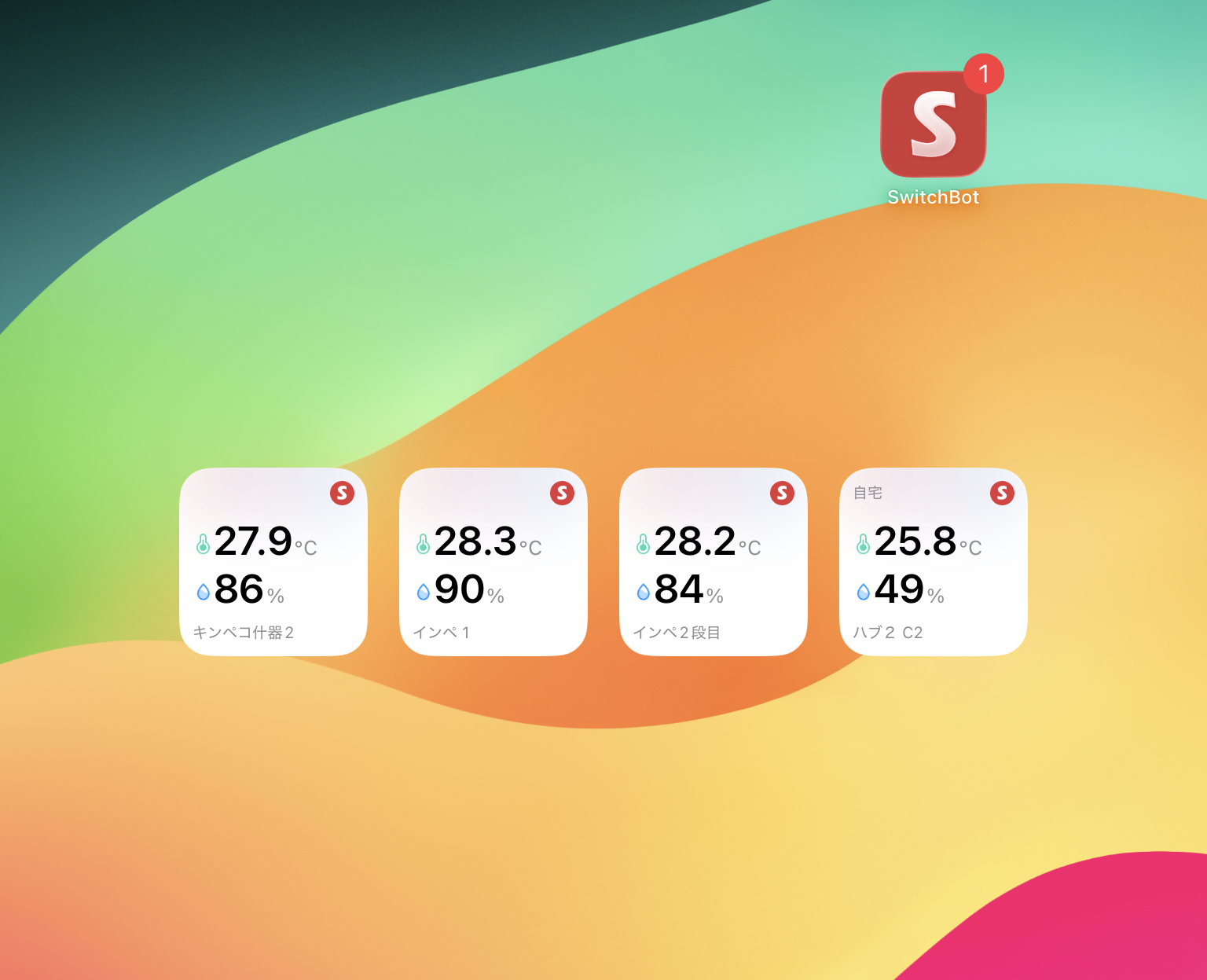
For me, constantly monitoring the water temperature of my King Tiger Pleco tank is crucial, so this feature is incredibly useful. Setup is also very simple: just select the SwitchBot app from your smartphone’s widget addition screen and choose the thermo-hygrometer you want to display. This allows me to quickly check the water temperature anytime, anywhere, and notice even slight changes immediately.
Alert Setting Caveat: Icon Turns Red, But No Push Notification
The SwitchBot app has an “alert function” where the thermometer icon turns red if the set temperature is exceeded. When I first saw this feature, I expected to “immediately detect abnormal water temperatures!” However, upon actual use, I realized there was a crucial caveat.
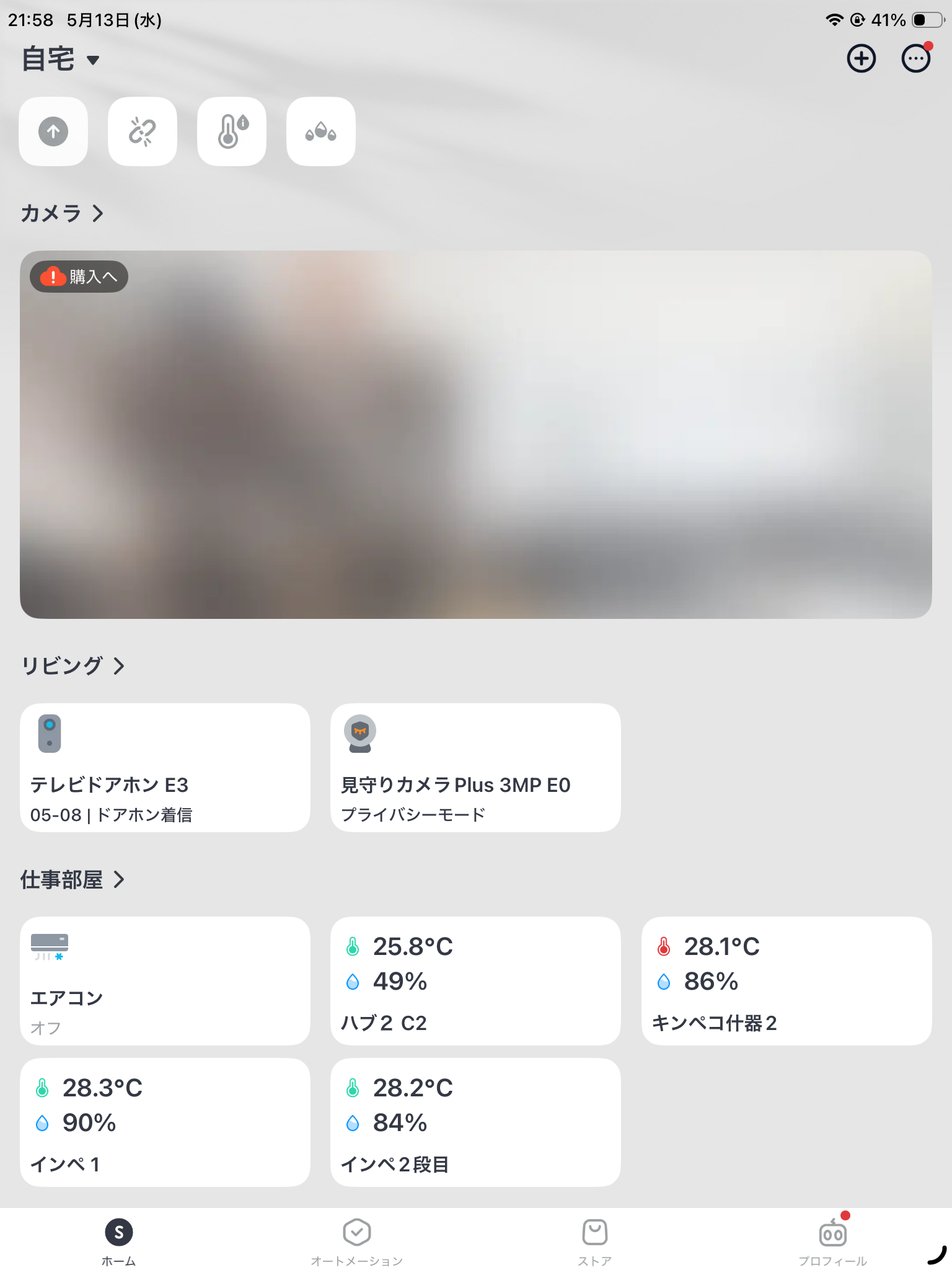
This alert function only changes the display within the app. This means that unless you open the app, you won’t be aware of any abnormal water temperature. If the water temperature suddenly rises while you’re out, a push notification won’t be sent to your smartphone, making real-time response difficult.
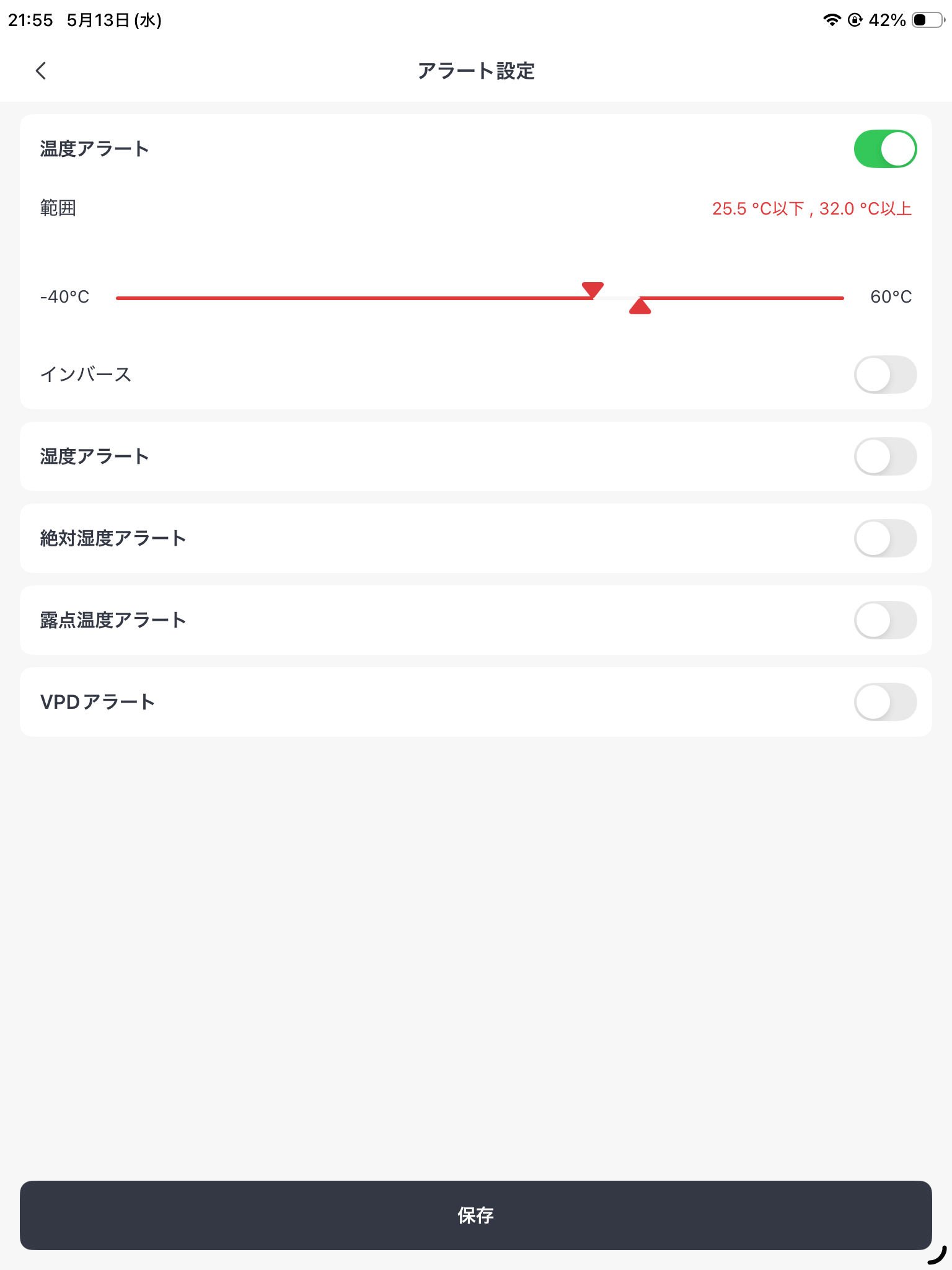
The image above shows the alert settings screen. While you can set upper and lower temperature limits here, this setting alone does not achieve the goal of “noticing abnormalities while away from home.” I realized that a different setting was necessary to protect my precious King Tiger Plecos.
Correct Setting to Receive Push Notifications: Use the Automation Feature
To reliably detect abnormal water temperatures and receive push notifications even when you’re away, you need to utilize SwitchBot’s “Automation feature.” This function allows you to set up conditions like “send a notification to my smartphone if the water temperature exceeds XX°C.”
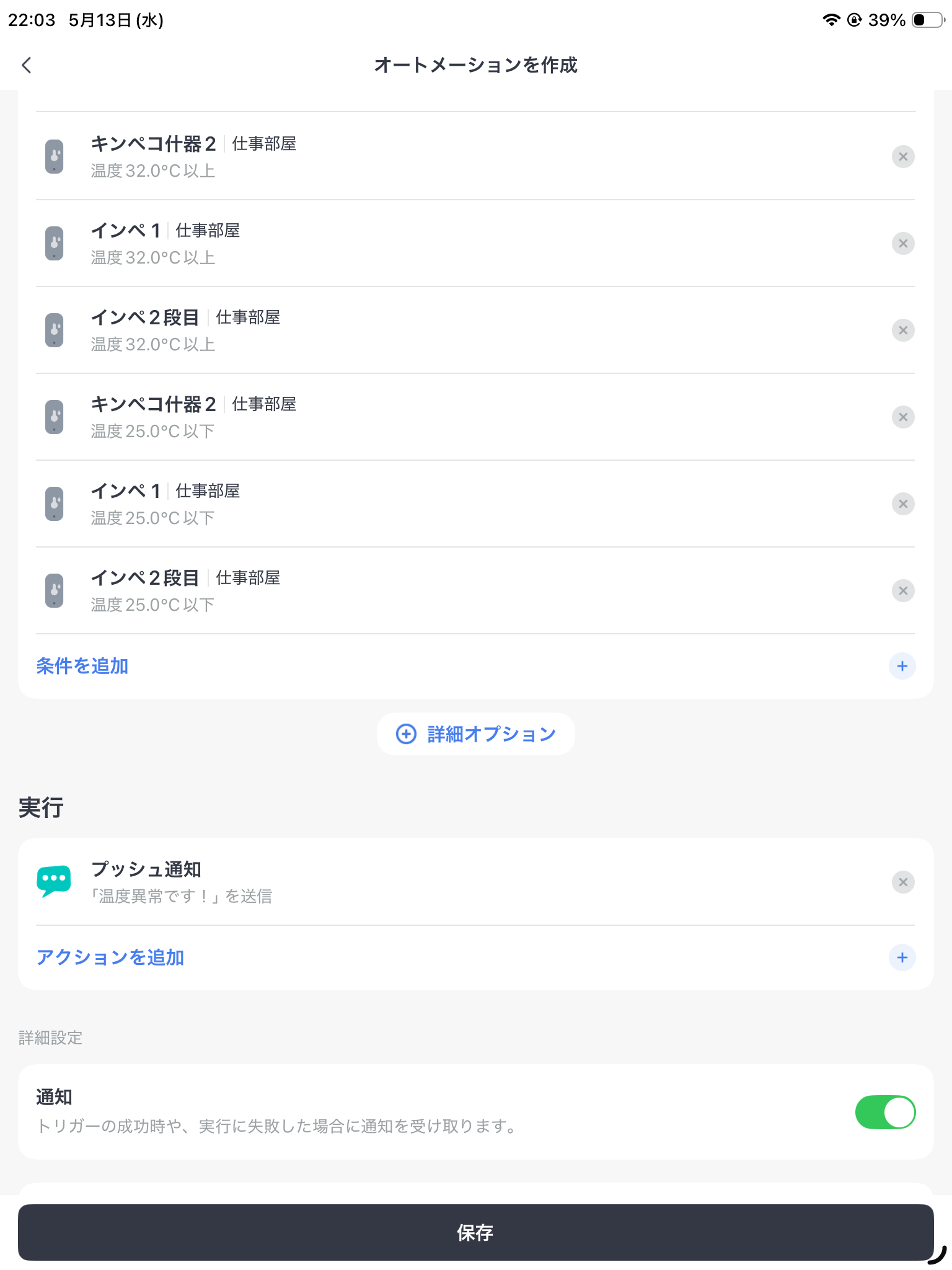
In my case, I’ve set up an automation to “send a push notification if the aquarium water temperature exceeds 32°C or drops below 25°C.” Here’s how to set it up:
- Open the SwitchBot app and select the “Automation” tab at the bottom of the screen.
- Tap the “+” button in the top right to create a new automation.
- Select “Device” as the “Add Condition” and choose the Waterproof Thermo-Hygrometer.
- Select “Temperature rises to ◯◯” and set the desired condition for notification, such as “above 32°C”.
- Select “Push Notification” as the “Action” and enter the notification content.
- Finally, save the automation.
Since setting this up, I now receive immediate notifications on my smartphone when the temperature exceeds the set limit, allowing me to manage my King Tiger Plecos’ water temperature with peace of mind even when I’m away. When a notification arrives, I can quickly check the situation and, if necessary, contact family members to take action.
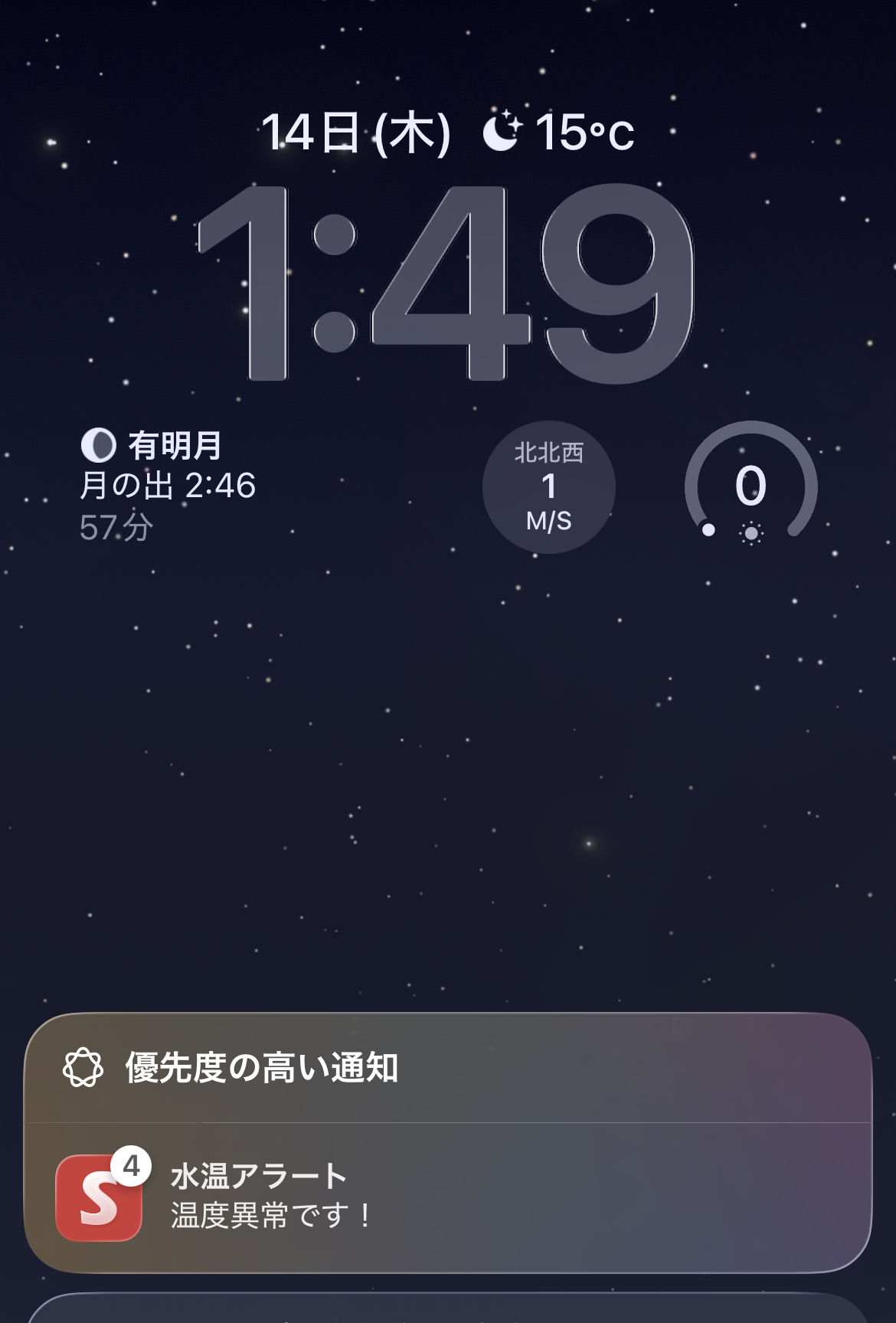
The image above is a screenshot of an actual push notification received. This has significantly enhanced the peace of mind I have regarding my precious King Tiger Plecos’ water temperature management.
Even More Convenient: Automatic AC On Setting
SwitchBot’s automation feature allows for not just push notifications, but also more advanced water temperature management. What I find particularly useful is the setting that “automatically turns on the air conditioner when the room temperature reaches 28°C or the aquarium temperature reaches 30°C.”
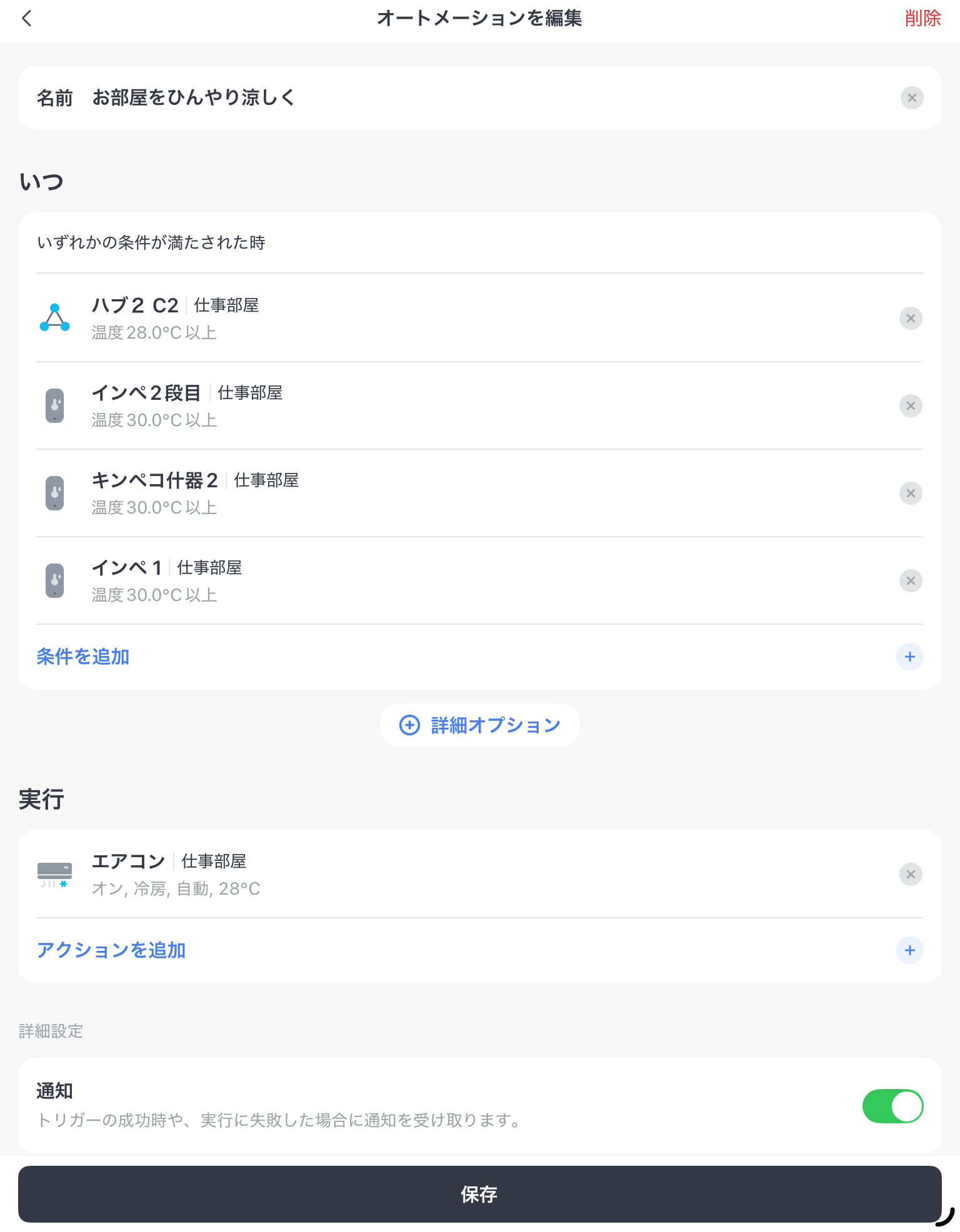
This setting ensures that the air conditioner automatically activates to suppress water temperature increases before they reach dangerous levels due to sudden room temperature rises in summer or heater malfunctions in the aquarium. For me, keeping temperature-sensitive fish like King Tiger Plecos, this feature feels like a true “lifeline.”
To set up this automation, you’ll need a SwitchBot Hub (Hub Mini, Hub 2, or Hub 3) and a SwitchBot Remote (or the remote control function built into the Hub) to operate your air conditioner. Here’s how to set it up:
- Create a new automation in the “Automation” tab of the SwitchBot app.
- Set the “Condition” as either the Waterproof Thermo-Hygrometer’s “Water temperature is greater than 30°C” or the Hub 2/Hub 3’s “Room temperature is greater than 28°C”.
- As the “Action,” select your registered air conditioner and configure settings such as “Power On” or “Cooling, 26°C”.
- Finally, save the automation.
This ensures that my King Tiger Plecos’ aquarium environment is always maintained at optimal conditions, even when I’m away, giving me complete peace of mind. I’m genuinely surprised at how much smart home technology can enhance the safety and comfort of an aquarium.
Required Equipment and Important Notes
To start managing your aquarium with the SwitchBot Waterproof Thermo-Hygrometer, there are a few required pieces of equipment and important notes:
- Required Hub: You will need one SwitchBot Hub Mini, Hub 2, or Hub 3. These hubs connect the Waterproof Thermo-Hygrometer to your Wi-Fi network and other SwitchBot devices like air conditioners.
- Waterproof Thermo-Hygrometer: You will need one Waterproof Thermo-Hygrometer for each aquarium you wish to monitor. In my case, I have one installed in my King Tiger Pleco tank.
- Wi-Fi Environment: A stable Wi-Fi environment at home is necessary. The hub connects to Wi-Fi, enabling smartphone control and data checking.
- Placement Note: The aquarium, SwitchBot Hub, and air conditioner must all be located in the same room. Since the hub operates the air conditioner via infrared, the signal may not reach if there are obstacles in between.
- Waterproof but Not for Direct Immersion: While the SwitchBot Waterproof Thermo-Hygrometer is waterproof, it cannot be directly immersed in the aquarium. In my case, I place it in a resealable plastic bag (like a Ziploc) and attach it to the glass surface of the aquarium. This prevents water damage while accurately measuring the water temperature.
- Important Note Regarding Hub Mini: The Hub Mini does not have a built-in thermo-hygrometer sensor, so push notifications and automations triggered by the Waterproof Thermo-Hygrometer’s water temperature data work without issue. However, to support automations triggered by room temperature (e.g., “turn on the air conditioner if room temperature exceeds 28°C”), a Matter-compatible version of the Hub Mini may be required. Please note that this information may change, so it’s advisable to verify it yourself.
Summary
The combination of the SwitchBot Waterproof Thermo-Hygrometer and Hub is a powerful ally for pleco enthusiasts like myself in managing aquarium water temperature. The widget feature allows for easy temperature checks, and the automation feature provides various layers of security, such as receiving push notifications for abnormal temperatures or automatically turning on the air conditioner, even when you’re away.
Especially for me, keeping temperature-sensitive King Tiger Plecos, this system has significantly reduced my daily anxieties. I truly feel that integrating smart home technology into aquariums can create a safer and more comfortable breeding environment. I encourage everyone to consider using the SwitchBot Waterproof Thermo-Hygrometer to smartly manage the water temperature for your beloved fish.
 Pochipp
Pochipp
Pochipp
コメント